
How I disconnected from tech in 2025
And how this simple spreadsheet will help you do it in 2026

For years, nothing felt real. Ever since I took my laptop home from the office in March of 2020, the world felt increasingly distant, simulated, controlled by powers beyond my comprehension. I was living in a mediated reality without direct connection to the world outside my front door.
In January of 2025, I decided to do something about it.
Though I tried many different things to connect with reality again, nothing had a bigger impact than my efforts to change my relationship to technology. In the course of one year, I systematically attacked every device, service, and app that in any way distorted my experience of reality. I came out of the experience changed.
So it isn’t surprising to me at all that many people have chosen “disconnect from tech” as one of their New Year’s resolutions. In the hopes that it may help people on that journey, I’m going to share what I did, what I learned, and offer some tools for escaping the technosphere (including a special spreadsheet that I think will help a lot.)
Principles for disconnecting
In the beginning, my project was really just a long list of stuff I wanted to get rid of or replace. But by the end, patterns had emerged and I saw the problems so much more clearly. Here’s what I wish I’d known when I started.
You have to understand your own motivation. Understanding the problem you actually want to solve is the key to identifying what changes are most important or meaningful to you and keeping up the motivation to make the change. There are many good reasons to change your relationship to technology — to escape the grasp of big corporations, to reclaim your time and attention, to be in control of your own choices. Personally, I felt that I wasn’t in direct contact with reality, that everything was a mediated, virtual experience owned by tech corporations. Take some time to reflect on what you really want and why.
It’s a marathon, not a sprint. We’ve all spent many years racking up accounts, devices, and services, all of which are easier to acquire than to get rid of. I spent all of 2025 on this project and while I made a huge amount of progress, I’m still not done. Like diet and exercise, this is a choice you’re making for your long-term health and well-being, and the battle will be won in months and years, not days and weeks.
Learn to love (or at least accept) inconvenience. If you ask people what their values are, virtually no one will say “convenience”, yet that’s how we make so many of our decisions. Streaming services are convenient, two-day shipping is convenient, optimized platforms are convenient. If you want to get clear of this stuff, you have to accept that some of the stuff you’ll have to do will be clunky, janky, fussy, slow, or difficult. It’s really not so bad.
If you don’t want to be the product, you have to pay. We’ve all gotten used to free services. “You won’t own anything and you’ll be happy” turned out not to be true, and more importantly, obscures who actually does the owning. I now pay for things I used to get for free, and I’m glad to do it because it gives me back control.
Tech is insidious. You need to be persistent. The big tech companies have lured us in with convenience and novelty, but the real trap is often dependence. I found that many of the apps, services, and devices in my life had multiple purposes, some of which were harder to give up than others. It requires diligence to slowly remove all of these dependencies.
Don’t just delete. Replace. Everything you try to get rid of served some kind of function or purpose in your life. On a practical level, if you want to quit streaming music or stop relying on corporate cloud storage, you will need to find alternatives. Don’t worry, options exist and they’re actually pretty good. And on a personal level, if scrolling is what you do when you’re bored, you’ll need to find some activities to take its place.
Stay flexible about the outcome. I defined what I thought successful outcomes would be at the beginning of this project. But I was surprised to find that sometimes, once I had reclaimed some control over a technology, it didn’t feel so pressing to be completely rid of it. The problem, for instance, wasn’t that I have a Google account, but that I used it for so many things. Once I had reduced what that account did, it didn’t feel so awful to have it around. We all define success for ourselves, and sometimes that definition changes.
On the other hand, sometimes the only real solution is total disconnection. I found that there were some technologies that I simply couldn’t have a positive relationship with. There is no healthy dose of TikTok, and no matter how I maneuvered around Instagram, I would always end up back there somehow. Some things you just have to delete entirely.
Taking action
Auditing my tech
I’m going to offer you an exceptionally powerful tool for changing your relationship to technology: an Excel spreadsheet.
You see, my goal wasn’t just to use social media less” or get out more. It was to fundamentally alter my relationship with technology. That’s an amorphous, complex thing that permeates so many dimensions of my life. I had to be systematic.
So near the beginning of the year, I created a spreadsheet and audited all of the devices, services, and apps I used. For each one, I filled out the following information:
What I used them for
What ecosystem they belonged to (Apple, Amazon, Google)
A rating of how “evil” I thought they were (malicious, neutral, benign)
A rating of how hard I thought they would be to get rid of (easy, medium, difficult, punishing)
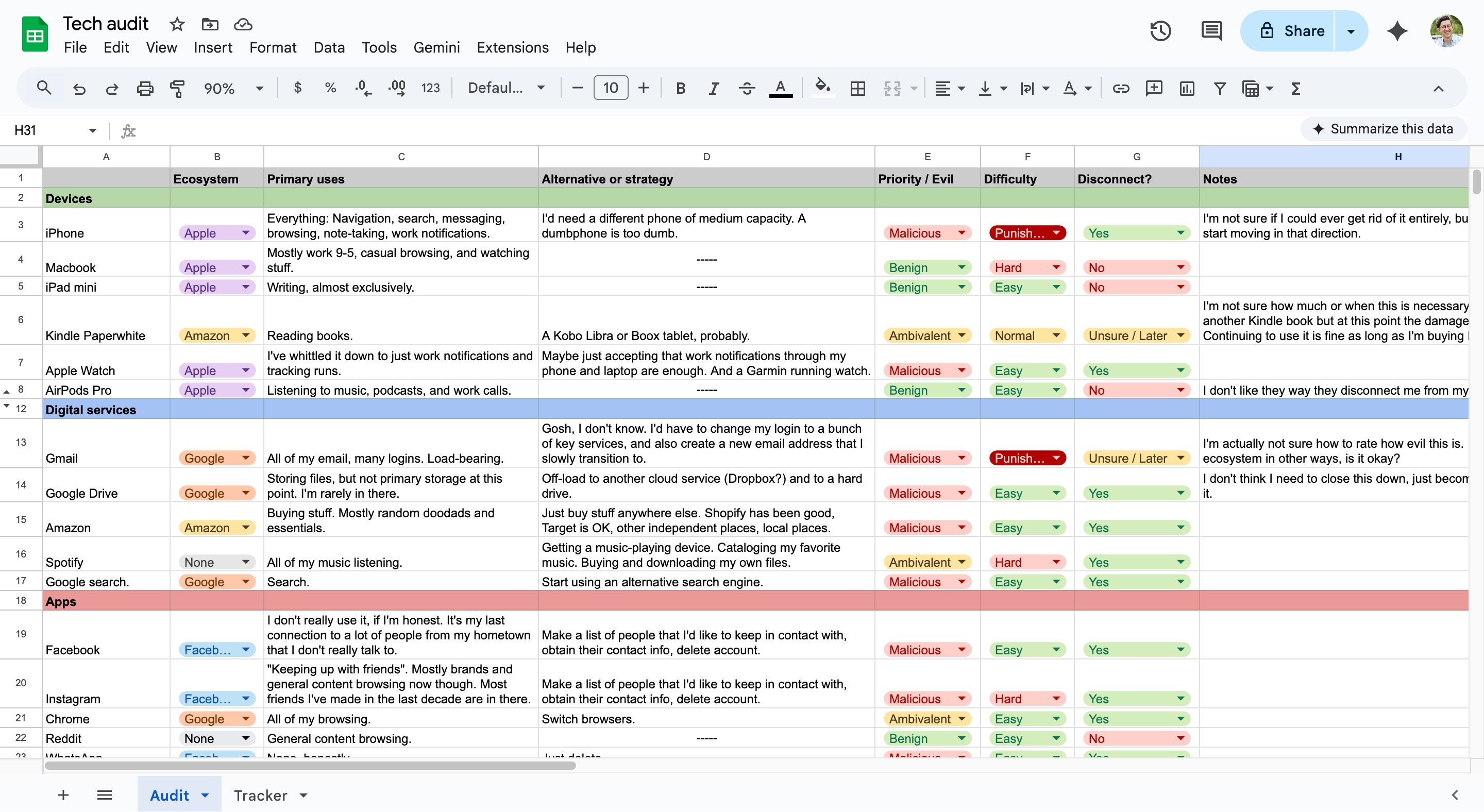
This was necessary for me to wrap my head around the problem and build a plan of attack. For example, I may dislike how I spend a lot of my time on my MacBook, but I don’t actually think my MacBook is the problem, whereas I felt that my Apple Watch and Google Photos were screwing up how I perceived the world and myself. This is all very personal. If you try this, you will have a different list of technologies, but you will also feel differently about each of them than I may have.
Once I had completed my audit, I made a second spreadsheet. The purpose of this one was to track my progress. I carried over all of the technologies from the first sheet that I wanted to disconnect, then I sorted them by difficulty. I then broke that list into roughly three tiers: quick wins that I could knock out in a sitting, medium difficulty projects that might require some sustained attention over weeks or months, and the truly punishing technologies that were completely ingrained in my life.
Then I started plotting. I wrote a line or two for each one about how I thought I would tackle them, as well as defining what success looked like. Each week I checked the spreadsheet and chipped away at the next item on the list. When I made progress (or had to change tack), I updated the spreadsheet with my next step.
Some weeks I made no progress. Sometimes I was working on a few different projects at the same time. There was rarely any sort of urgency and if I didn’t feel like working on it, I didn’t. But I often found it so interesting and satisfying that I would willingly dedicate my free time to it.
A quick note, there’s some stuff I don’t address in here because it wasn’t part of my tech stack, but it might be a part of yours:
TikTok / short-form video — I went through a three month binge of TikTok a few years ago, deleted it, and never went back because it was perhaps the most nakedly manipulative thing I’ve ever come in contact with.
Micro-blogging platforms — These are close in their amount of evil, and I have been off Twitter et al for a long time now. You are what you consume, and there’s no way to be a good consumer of hyper-reactive micro-sentiments.
TV streaming — I don’t stream a lot of TV or movies so it wasn’t something I was worried about getting rid of, and I only have maybe one account to begin with.
Smart devices — I have never had anything that responds to “Hey Alexa/Siri/Google” turned on for general use in my life, but I would have turned those off if I had.
Also, AI is notably absent on this list. I haven’t become hooked into or exposed to AI in any ways that need to be painstakingly disconnected. Yet.
Tier 1: Easy
I started out with quick wins, changes that I could make in a single day.
Shopping on Amazon
For many years, I consoled myself that I didn’t buy a lot of stuff on Amazon. My family had a Prime account and they weren’t going to cancel it just because I stopped using it. So what was the difference if I ordered something now and again?
That, as they say, is how they get’cha. Amazon is based on one principle above all else: convenience. You were going to buy this thing anyway, so would you rather buy it from a store or have it delivered? What if there was no shipping cost? What if it would get here tomorrow? Suddenly, there’s no compelling reason to ever visit a store again, and no other retailer can match them.
My first step was to turn up the friction. I removed my credit card and home address from the Amazon account, deleted the password from my password manager, and deleted the app from my phone.
Then, I needed to replace all of that online shopping with something else. To make things harder, the next natural alternative — Target — became more morally complicated around the same time I started this project.
Once I forced myself to get creative though, I found that there are now some really great alternatives to Amazon for online shopping now:
Etsy: Shopping vintage and handmade from small businesses whenever possible was my first line of defense. As a bonus, you can find a lot of stuff with more personality. I’ve used Etsy to get weird and interesting doodads for a long time, but this was maybe the first year that I thought of it as a place for practical shopping.
Shopify: Many small businesses now use Shopify, which eliminates the primary pain-point of buying from independent websites: filling out all your payment and shipping information. You can even search across shops from their app, which allows you to find stuff from tons of small, specialty storefronts.
eBay: I’m here to tell you that eBay is actually great. Turns out that many manufacturers now sell their open box and refurbished products on eBay. I got a power drill, a space heater, a cordless vacuum. It costs less, reduces waste, and avoids Amazon while being basically an identical product. And if you get into vintage electronics the way I did this year, it’s the place to go.
Getting off of Amazon entirely wasn’t too hard. The secret, as I’ve said, is accepting inconvenience. It requires a little extra searching, paying more shipping fees, and waiting a little bit longer.
Oh, and pro tip: Maybe just buy less stuff.
Google Drive
As with many of the technologies on my list, Google Drive got into my life by being useful and seemingly harmless. They honestly didn’t have to work very hard to make a better product than Microsoft Office, and I didn’t think twice about the difference between cloud and local storage at the time.
But just like real life storage facilities, once you’ve given them all your stuff, they basically own you. If I ever wanted to be free of Google, I had to find somewhere else for my stuff to go.
Google Drive is one of the easiest Google services to get out of. First, I bought an SSD (SanDisk Extreme Portable SSD, 1 tb) and copied all of my files to it. I also had a few services and devices that used Google Drive for their remote storage, so I created a Dropbox account and moved my backups there. Easy.
I still use Google Drive from time to time, and it’s a big part of my work life, but the important thing is that I have demoted it back to what it once was: a simple utility.
Google search
It has been the dominant search engine since it was invented. It is even the word for doing such a search:
Google (v) — to search for something on the internet
On one level, I don’t really care that Google uses its data to target ads at me. Isn’t it better to see a relevant ad than an irrelevant ad? And what does it matter if Google knows what deodorant I use or that I’m trying to find a site to watch The Nice Guys? Besides, I use uBlock origin.
What I actually care about is the fact that in macro, targeted content distorts reality. I have no idea which websites and companies are working to silently shape my perceptions of reality based on what Google tells them.
Also, Google’s dominance allowed it to enshittify in a big way and it’s not even a good search engine anymore, so good riddance.
When I looked around, I discovered that there are a new spate of competitors. It’s not just Bing and DuckDuckGo anymore! Here’s a quick summary of what I found:
Kagi: A paid search engine. Their argument is that paying for search avoids making you the product, and this has been a pattern in my efforts. Kagi brings fun and life back to search engines.
Brave: Another paid search engine. I’ll be honest, I don’t like the lion logo. It’s a dumb reason, but I don’t care! They have their own indexing.
Startpage: Free, with minimal ads. It provides Google-quality search results but without the privacy violations. Probably the smoothest transition.
I added all of these to the search options in my browser settings and now I readily flip back and forth between them. I don’t think this is a case where you have to settle on a single best option. Heck, I still use Google for certain specific use-cases now and again. The point, really, is to reduce dependence.
Google Chrome
Google Chrome was cool, once upon a time. Now it’s just another browser, and one that sort of chugs at that. The only reason I’ve stayed with it is inertia.
In replacing it, I wanted something mature, stable, and independent. So I went back to FireFox. It’s a browser, and it isn’t made by Google, Microsoft, or Apple. Mission accomplished. The browsing experience is almost identical, but now my data isn’t feeding Google’s profile of me.
Instagram, Facebook
Social media is maybe the most difficult tech disconnection to make because something in your brain says that you’re abandoning your friends. Yeah, you may absolutely loathe the amount of time you waste on Instagram and feel that it’s rotting your brain and making you into a bad person, but are you really going to cut yourself off from your social network??
However, I found this mostly to be an illusion. When I really looked at my Instagram with a critical eye, I found that I wouldn’t be losing much. Most of what I did on the app was idle content consumption. Sometimes that content was made by my friends, but that content wasn’t what I actually liked about my friendships. I enjoy actually talking to these people and spending time with them, not the false intimacy of seeing their vacation photos. Besides, I had most of the important people’s phone numbers. When I really tried to account for what I would lose without Instagram, the answer was: very little.
I’ve tried to limit my Instagram usage for years. I’ve set usage limits, blocked the domain, deleted the app. But it didn’t really matter what I did. I would either find a way around the block or simply remove it. This time, I decided to just delete it.
I used the download tools in account settings to get all of my pictures and videos saved on my SSD. You have to navigate a labyrinth of menus to do this because they really don’t want you to do this. With that done, I just deleted it.
I planned to delete Facebook after that, which was going to be even easier because I had already deleted it once many years ago. But when I logged in to delete it, I found that Meta had gone ahead and deleted my account due to suspicious activity. I don’t know what that was about, but — and this is the only time I’ll ever say this earnestly — thanks, Zuck!
I no longer have any relationship to Meta. Hooray!
Apple Watch
I got my first Apple Watch without really knowing what it would do for me. It was a neat gadget, the next evolution of the Apple ecosystem. Like many people, I found it convenient to see notifications on my wrist and track various health and fitness metrics. But that metrification meant that this device was in control of how I understood myself and my health, and the constant tether meant I wasn’t never really away from my phone.
I felt anxious about losing those instantly visible notifications. Truly, the biggest thing tying me to the Apple Watch was the idea that I needed to see Slack messages during impulsive midday showers. The solution was that I simply decided to be okay with not seeing everything immediately. This is how things used to be, and they could be that way again.
I also used my watch for my morning alarm, so I got myself a good alarm clock. I settled on a Loftie, which is itself a somewhat fancy piece of technology, but in practice it’s actually pretty set-it-and-forget-it.
I could have continued to use the Apple Watch just for workouts, but part of the dangers of these technologies is that regardless of why we acquire them, if they can do something, we often end up using that functionality.
Instead, I got Coros Pace 3 — a simple but effective running watch. As with many of my replacement technologies, the Coros is a better running watch than the Apple Watch was. Its battery lasts longer, it has a memory-in-pixel screen that is always visible and looks great in direct sunlight but only lights up when you need it to. I use it for running and pretty much nothing else.
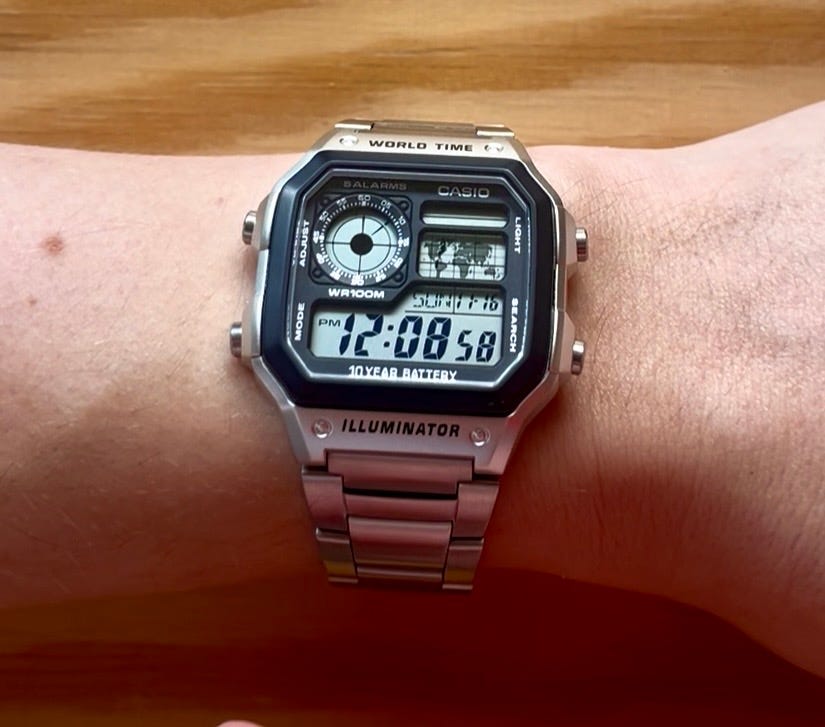
And once I was free of the Apple Watch for a few months, I decided that maybe I wanted a watch that was just good at being a watch. The Casio Royale is what passed as a smart watch in the 90s and 00s — it has a timer, stopwatch, alarm, and world time clock, and it has a delightful retro-futuristic aesthetic. It turns out there’s a whole subculture around Casio watches and now whenever I see one out and about I feel like I’m in on something.
Tier 2: Hard
Once I had gotten the low-hanging fruit, I started on projects that would take me a little bit longer to pull off.
Google Photos
I remember running out of local photo storage on my phone for the first time in the early 2010s. At the time, I resented the idea that Apple wanted me to pay them a monthly fee for expanded iCloud (ha!), so I opted for Google Photos, which was free for the amount I was using at the time. By the time I decided to get out, I was paying monthly for the 100 gb version of Google cloud storage, most of it taken up by photos and videos.
It is, admittedly, super convenient to be able to access all of your photos anywhere you go and to be able to search your photos using keywords. From another perspective though, it was pretty annoying that there was a company that had control of all of my photos.
Google Photos has a way to download your repository all at once. Then I simply loaded it onto my SSD, then delete everything from Google Photos. Since I hadn’t been manually managing my photo library up to this point, this was a sort of unusable mess. So I used a piece of software called PhotoSweeper to reduce duplicates, similar images, and poor quality shots.
Kindle and Audible
Though Amazon has become the Everything Store, it all started with books, and they’ve never let go. And as with everything it does, it has dominated its competition through pure efficiency and convenience. No one held a candle to the Kindle or Audible for years, and so that’s what I used.
When I started this project, I knew I never wanted to buy another ebook or audiobook from Amazon again, but I wasn’t planning on doing much more than that. Then Amazon announced that it was removing the option to download your ebook files, and I took that personally.
While there was still time, I painstakingly downloaded each file individually, removed the DRM, converted the formats, and organized my library in Calibre — free, third party ebook library management software. I did something similar with Audible through OpenAudible.
At that point, I could have continued to use my Kindle, but I wanted out of the ecosystem entirely. Instead, I got a Kobo Clara BW and I now buy my ebooks from the Kobo store. And I get my audiobooks through Libro FM, which is an almost perfectly lateral move from Audible in terms of functionality.
Spotify
Spotify promised that I would never have to buy an individual song from iTunes ever again. I could listen to whatever I wanted, whenever I wanted. Sure, artist compensation was terrible, but it’s not like they were making bank on 99 cent downloads either.
But in recent years, I had long come to feel that Spotify had ruined my experience of music. As Erik Hoel would put it, my algorithm had become “over-fitted”, serving me a very narrow, boring idea of what it thought I liked. The human curation was gone, the discovery felt drab, and I felt like I was fighting the interface just to see what music I had saved.
For that reason, my first step wasn’t simply to replace Spotify with a different streaming service. I wanted to rediscover music unmediated by an app subscription model.
I went down the rabbit hole of rebuilding my music library, almost from scratch. I made a catalogue of the music from Spotify that I wanted to own, fought with iTunes to reclaim my long lost library, bought a lot of tracks and albums from Bandcamp and the awfully named Qobuz, and sailed the Seven Seas just a bit. I ended up with a catalogue of 1700 songs that I fully and completely own.
I spent weeks monkeying with near-dead iPods from eBay and the new crop of Android-based “digital audio players” (which are mostly uninteresting to me). I settled on an iPod Mini with a fresh battery and expanded flash memory. The clickwheel is unbeatable and non-algorithmic “shuffle all songs” is a killer feature. I also found that listening to music through wired in-ear monitors sounded meaningfully different than my AirPods.
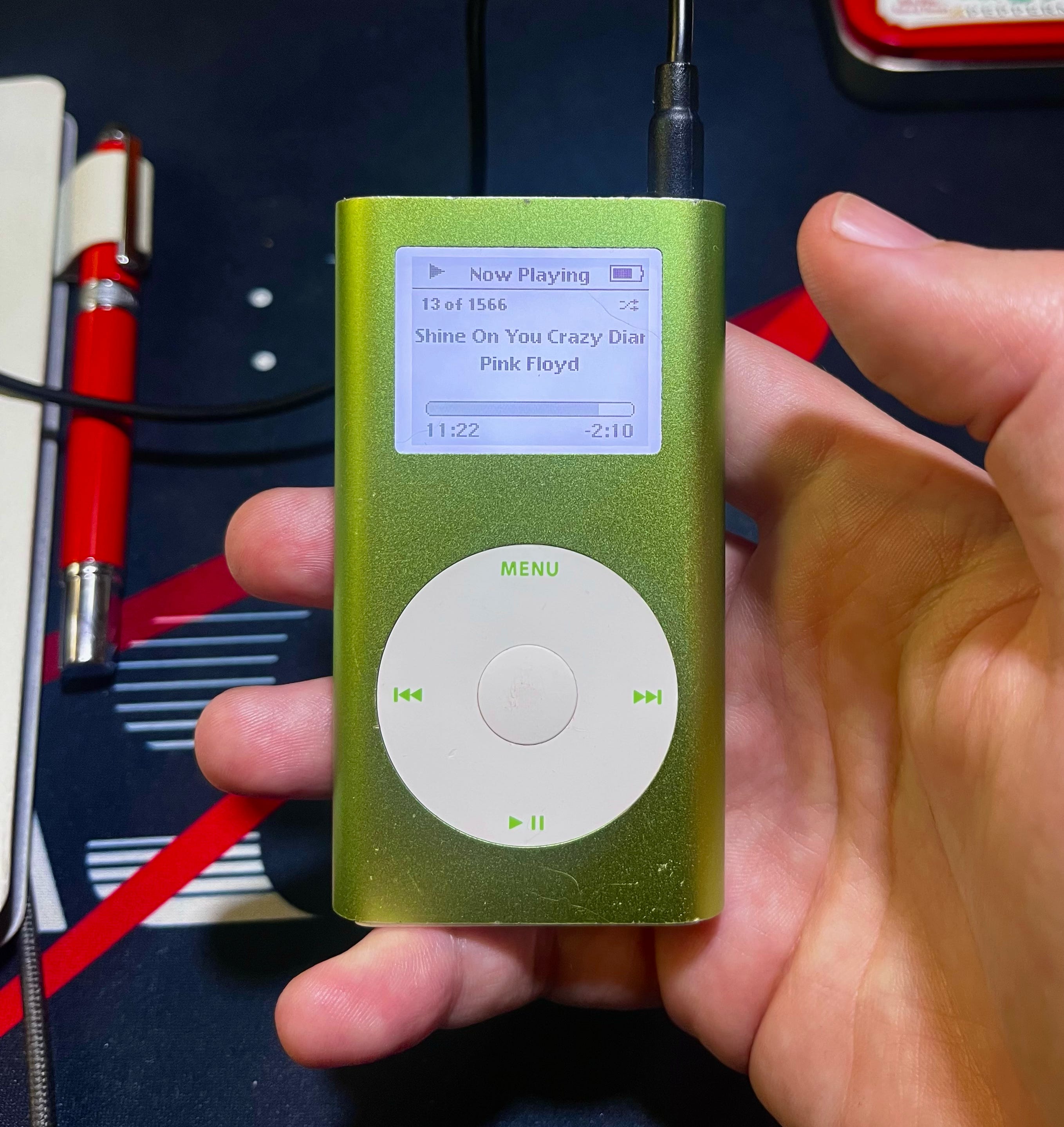
I didn’t actually feel pressed to get off of Spotify though, just to replace it a bit, and I succeeded on that count. Listening to music felt fun again.
But later in the year, more news came out that moved Spotify from the “ambiguous” moral category to the “evil” moral category. So I tried out Apple Music and Tidal and settled on Tidal because it was almost exactly the same as Spotify. Migrating is nearly painless. The interface is a bit more bland and there isn’t much in the way of generated playlists, but if you’re considering a change, there’s very little reason not to.
Tier 3: Punishing
Finally, I came to the big, sticky problems — the technologies that are almost impossible to escape.
Gmail
I knew that I would have to chip away at Google. Offloading my files, reorganizing my photos, switching my browser and default search engine. All of these are piddly things in comparison to Gmail. It’s the username I log in to hundreds of websites and services, which means that Google gets every receipt, confirmation, reservation, and newsletter. Google really doesn’t need anything else from me as long as they have me locked into Gmail, and it’s immensely hard to undo. And unfortunately, that’s what makes it more important than all of the rest.
Patience.
The first step was to find a replacement. I looked into email providers that were smaller, private, had no conflict of interest, demonstrated long-term stability, and didn’t have a goofy name. Several met my criteria, but I settled on Fastmail, mostly because my desired handle was available. It’s another service that’s $5 a month and I’m happy to pay it. Presumably, that’s how much Gmail would cost if they weren’t selling my information. I set up inbox forwarding and now I don’t log into Gmail at all.
Now I’m engaged in the diligent process of moving all of my accounts over to the new email address. I started by going to “Third-party connections” in my Google account settings and unhooking Google authenticated login from almost everything. Most services will then allow you to use your email address and a password or one-time code to log in. Now, every time I log in to some website or service, I try to take a minute to change my login to the new email. It will take time, but someday in the near future, I will no longer use Gmail for anything important.
iPhone
Imagine you are standing in a field holding a rock, and you throw it as hard and as far as you can. Then you look down at your hand and there is the rock. That’s how I feel about my phone.
The phone is so hard to get rid of because it’s the nexus of everything. It’s how you listen to music, watch videos, take photos, text your friends, make calls, take notes, track your appointments, check your email, wake up in the morning, it’s a flashlight, it’s an entertainment system, it’s a calculator, it’s your navigation system, it’s your plane ticket and your payment method. This makes it nearly invulnerable to escape. You’re not just addicted, you’re entangled.
So the strategy isn’t just “replace the phone”, it’s to weaken it by a thousand cuts. This is also why it comes last. Everything up to this point has removed arrows from the phone’s quiver. We have deleted accounts and apps and services, and the hold of the phone has been weakened.
In truth, I have been attacking the phone for years now. Here are some of the tactics I’ve employed:
Delete as many apps as you can. Even boring ones that you’ve forgotten about. If you don’t need it, get rid of it. Every additional app is another potential distraction and contributes the general feeling of infinite novelty.
Keep a minimal home screen. Leave everything else in the app drawer. The goal is for your phone to be a little boring. When you pick up your phone for no particular reason and look at your home screen, you should think “huh, I don’t need to do any of that right now.”
Reduce notifications to bare essentials. Every notification is an invitation to open your phone, or clutter that makes it harder to think clearly about what you’re doing. A notification should be something actually important and timely; everything else can wait until you open the app again.
Use a simple, brutally effective blocker. I’ve investigated the options over the years, and nothing works as well as Freedom. It’s paid service that blocks sites and apps at the domain level, across devices. It has various levels of locking intensity, all the way up to needing to contact customer support.
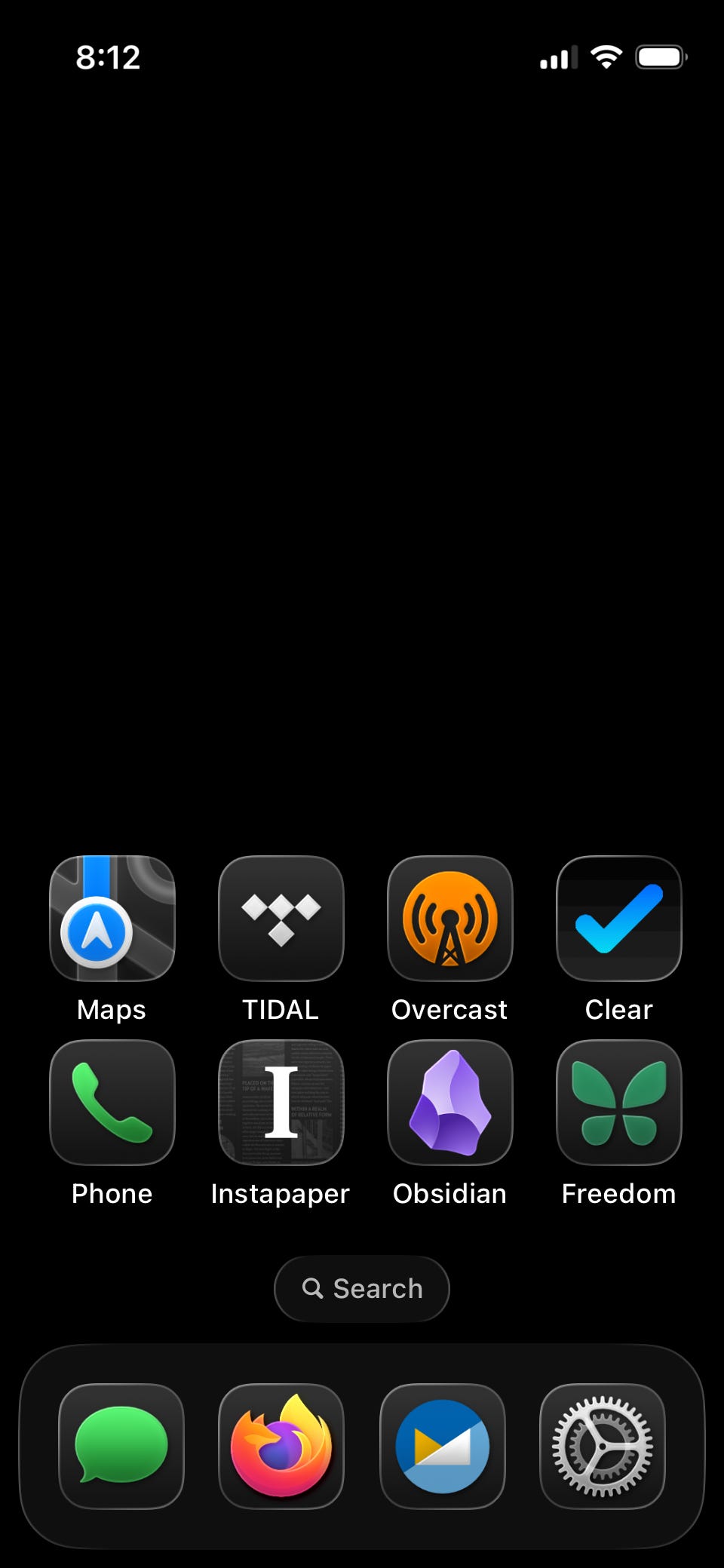
Most of this stuff I tried or implemented before 2025, and yet 2025 was a big year for reducing the influence of my phone, and it seems to be due to the fact that I made so much progress on so many other fronts. I detached from so many device integrations and services that my phone’s hold shrank almost without me thinking about it.
I don’t think there’s anything inherently wrong with a handy little pocket computer. The phone isn’t the problem, it merely contains problems. And yet, I think the smartphone paradigm is fundamentally broken at the moment. If you take the steps necessary to make your phone a healthy device, I think you will find that you aren’t using a lot of what it was made for. If you aren’t consuming videos, scrolling, or playing games, then why do you have this enormous glass slab?
We, as consumers, have been denied real choices about phones for years now. Basically, you can get a dumbphone and be constantly blocked out of interaction with the modern world, or you can get a consumption phablet that barely fits in your pocket. Still, I’m hopeful that this will change soon.
What changed for me
To my surprise, my plan actually work worked. Some part of me figured that this was a lost cause and my plan was a series of meaningless gestures in the face of an unbeatable opponent. I was going to scream and rage into the hurricane, but my ship would still go down.
But that’s not what happened. Basically every single change I made brought at least some small, lasting sense of relief. I would replace a device or delete an account and think “Wow! I did it! This feels great!”
In fact, I find myself forgetting how it used to feel just a year ago. I hear people talk about their relationship to technology and think “oh yeah, it used to be like that.” I really don’t mean to sound high and mighty. What I actually mean is that the result is fairly humble. I don’t feel like a genius or a guru. I don’t feel like life is easy all of sudden. But I do feel a bit closer to how I felt years ago, before the tech ecosystem engulfed us. It’s possible, is what I mean to say.
I also found some new hobbies along the way. See, I’m actually not an anti-tech guy. I love gadgets and widgets and doodads, I love to tinker. Looking for replacements to virtual services and devices led me into so many more interesting technical forays. I mucked around with modded iPods, film cameras, old Game Boys. I actually learned things about various kinds of hardware and software rather than letting big companies selling me out of the box solutions. (I always thought Zen and the Art of Motorcycle Maintenance was unbearably pretentious, but that doesn’t mean having personal mastery over the technology your rely on was a bad idea.)
What’s next in 2026
As I said before, there was too much to accomplish in a single year, and there are still a few projects I’d like to pursue in 2026, including:
Setting up a NAS for remote file storage. Based on some cursory research, it seems like this may be easier and more feasible than I would have assumed. The main downside of getting off Google was that I don’t have access to their cloud services. I don’t need instant, remote access to all of my digital stuff, but it would be nice to have.
Changing all of my accounts over from Gmail to Fastmail. I rarely log into Gmail anymore, but it’s still the username for so many of my accounts. As long as that’s the case, Google owns a part of me. Slowly but surely, I’m changing all of my account logins.
Making physical photo albums. I want to go through all of the photos on my SSD and curate a collection of pictures from each year that I actually like, print them, and put them in photo albums that I can just pull off a shelf.
Continuing the quest for a good phone. For the first time in years, a small crop of companies is working to make phones that aren’t just enormous glass consumption slabs. I’m hoping that in the near future, we will once again have options regarding what kind of phones we carry and I’m looking forward to trying them out.